

simplifying a ‘to do’ workflow

During the 2016-2017 School year, I worked as an administrative intern, math AIS teacher, and attended 2 – 3 classes per semester at the University of Rochester.  One of the biggest challenges I faced was how to create comprehensive to-do lists, store information so that it could be recalled when necessary, and prioritizing long and short term projects.

I researched and tested over and over, eventually finding a system that I modified to work for me.  (Based largely on GTD).

I required that this system link to my  belief that simplicity and technology are essential for efficiency.

My current workflow is:

  1. Collecting information (Collection bin)
    • I collect information from e-mails. For written notes, my rocket notebook.   Sometimes, this means sending an email to myself or writing on a napkin and putting in my notebook later.
    • For action items, I use a simple “box” to show that I need to do something.
    •  Sometimes, I’ll use onenote for notes in this same way, using ctrl+1 to indicate if there are any ‘to dos’
  2. Decide (Reference, to do, or act) 
    • I have a one note notebook named “reference material.”  Within it, there are folders organized by anything an administrator would need – parent contact, PBIS, scheduling etc.
    • When I get an email I would like to keep, I use the ‘me@onenote’ feature to send it, along with it’s attachments to one note.  I’ll then place it in the appropriate folder.
    • If I can answer the email in two sentences or less, I do, then delete it. Otherwise, I schedule a time to meet and clarify.
  3. Schedule 
    • Steven Covey speaks about putting ‘first things first.’  So, I schedule my to do list using the program ‘ASANA.’
    • I place ‘to do’ items in the task list in Asana that meet the theme of each day of the week.
    • For larger projects, I’ll schedule a planning session where I map out incremental steps, also using Asana.

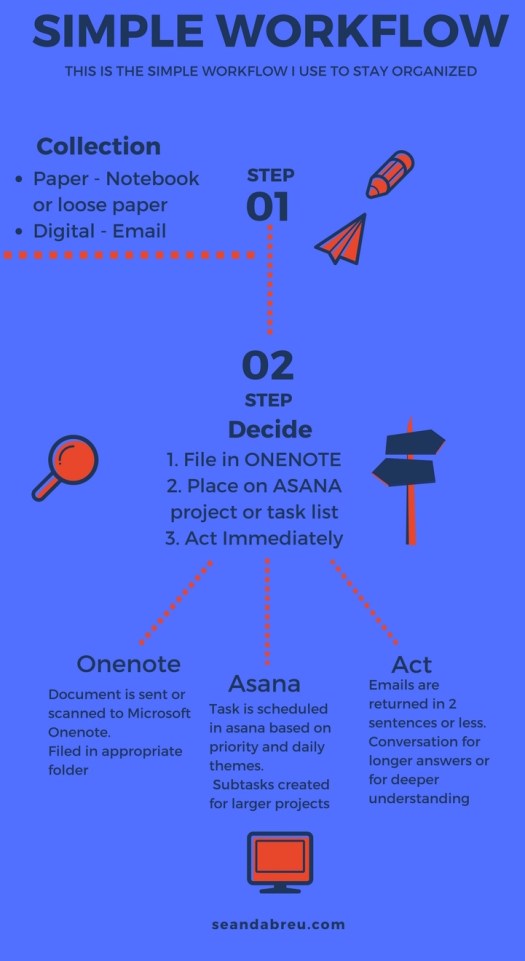
The infographic below shows my workflow.  This isn’t always the case, but 90% of the time I stick to it.  I’ve found when I stick to this workflow, it helps me become more efficient as well as opens up more time for creativity and leisure.
WORKFLOW

theme your days for productivity

We know that multitasking is a myth.  In order to perform meaningful work, as Cal Newport describes in his book ‘Deep Work,’  I theme my days.  Doing a lot of work doesn’t make you efficient nor does it make you productive. It simply makes you busy.

To stay efficient and to provide high-quality work, I theme my days.  This means I assign a category to each day and do the work that fits that day’s theme.  I do this using a web-based program  called “Asana.” I wrote about how I use Asana here.

Of course, little things come up, fires have to be put out, and someone always needs something last-minute.  That’s natural and part of leadership,  why ‘leaders eat last.’

My ‘deep work’ time that I’ve blocked out usually fits with the day’s theme. The themes that I’ve been using for about a year are:

Monday Tuesday Wednesday Thursday Friday
Instruction &  Planning PBIS & Student Behavior Data & Logistics Leadership/
Instruction
Planning
Special Projects/
Sharpen the Saw

If I don’t have a task that fits that day’s theme, I do one of two things:

  1. Use that time for creative pursuits that will help my school community
  2. Work on the next day’s theme (like I said, emergencies always come up, so best to get ahead)

The “why” behind theming days is quite clear: when you focus on something and place your full attention on it, you produce quality work.  As Cal Newport states:

Time Spent x Intensity of Focus = High-Quality Work

Some practical examples:

  1. On Monday my boss asks me to review data from last year’s ELA & Math state tests.  This is an easy one – I work on that during my planned time on Wednesday.
  2. A parent calls about something pressing – perhaps a safety issue or a problem with another student.  I take care of that immediately.  No need to wait until the next Tuesday.  It’s important and urgent.
  3. The cafeteria monitors would like some new decorations for the cafeteria and to revamp the positive referral system.  This could go on my task list for Friday or Tuesday.
  4. We have to read a section in a leadership or professional development book for an administrative team meeting.  This would likely happen on Thursday, possibly Friday during ‘sharpen the saw’ time.


Asana

A friend of mine who is both productive and successful, (VP of marketing before turning 30) recommended the web-based program Asana.  Asana is a project management tool that can be used remotely by teams.  Although it’s meant for groups, I’ve adapted it to create a digital to-do list and long term project management.
 
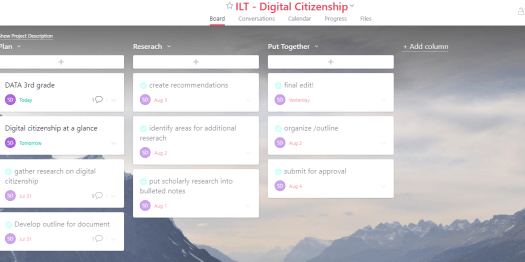
Could I use google keep, evernote, or one note? Sure. But I like asana because it lets me assign dates tasks need to be complete, and then puts them in the proper order for me.  I get a snapshot of my week, day and month .  (see picture below for an alternate project-based view). Asana assists in prioritizing my tasks, and also allows me to break large tasks into smaller ones.  It is  intuitive, and once you get used to it, powerful.
 
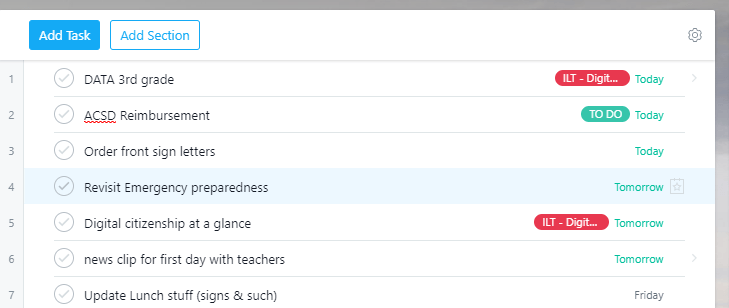
I use asana to help me theme my days and it keeps my workflow incredibly simple. You can see my sample tasks above. (note: ‘today’s’ theme pictured above is data & logistics,tomorrow’s is instructional leadership and planning.)
 
Asana has a simple but comprehensive quick start guide, so I won’t describe how to use it step-by-step here.

2.PNG

two sentence e-mail challenge.

I love and hate e-mail. I love it because it allows me to communicate my thoughts, and process them completely before sending. But, e-mail can be a hindrance.
We hide behind it, or we send lengthy e-mails assuming they’ll all get read. Then, frustrations arises when questions are asked that were “IN THE E-MAIL!”
 I recently came across two sentences. A personal pledge to respond to e-mail consistently, allowing more time to do the tasks that school leaders should be doing. I started doing it, making a pledge of “4 sentences” when sending outgoing mail.
 If it takes more than that, I need to reevaluate my means of communication, and see if 5 or more sentences is necessary.
Of course, it’s been difficult, and I’ve had to come up with some ‘exceptions’ to both my two-sentence and four-sentence rule. I’m sure I’ll be adding on – but so far I’ve found these exceptions are necessary:
  1. Explicit, complicated directions. I have taken time to script these concisely, and 99% of the time use bullet points for ease of use.

  2. A.P.B.s. All persons bulletin. If news needs to be shared to the entire school community, this can be difficult. I send 1-2 bullet points in the email, then will often send other info as an attachment, not wanting to to take away from the most important parts.

  3. Responding to multiple questions. I struggle with this.  Often I want to walk over and speak with the person, or call them on the phone. But that’s not always possible. So, I tend to number the other party’s questions, and respond each of them. (Keeping it under 2 sentences of course!)

  4. Inspiration quotes or ideas, or stories.  These can often be simple, but my commentary frequently needs more than 2 sentences.  I want to convey trust, understanding and background when I share these ideas.  I can’t help myself on this one.
Thank you for reading,
-Sean