


During the 2016-2017 School year, I worked as an administrative intern, math AIS teacher, and attended 2 – 3 classes per semester at the University of Rochester. One of the biggest challenges I faced was how to create comprehensive to-do lists, store information so that it could be recalled when necessary, and prioritizing long and short term projects.
I researched and tested over and over, eventually finding a system that I modified to work for me. (Based largely on GTD).
I required that this system link to my belief that simplicity and technology are essential for efficiency.
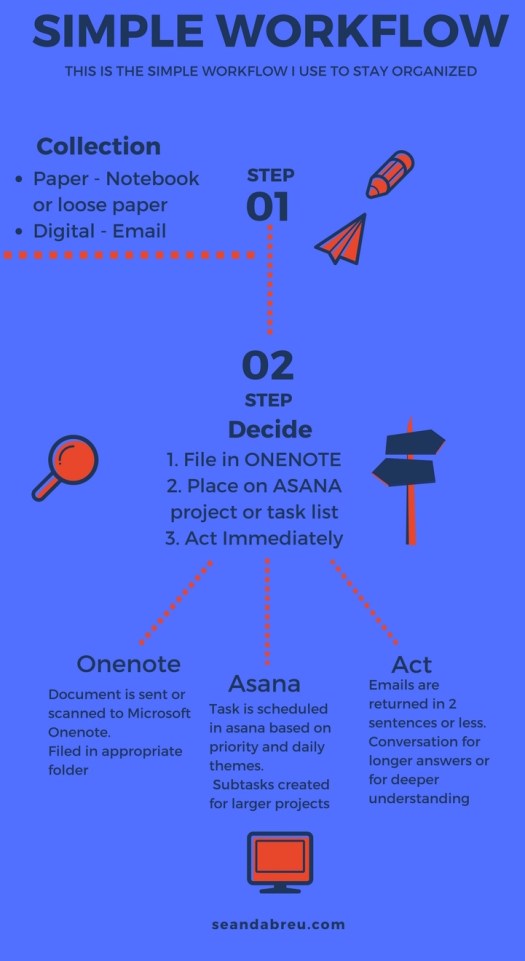
My current workflow is:
- Collecting information (Collection bin)
- I collect information from e-mails. For written notes, my rocket notebook. Sometimes, this means sending an email to myself or writing on a napkin and putting in my notebook later.
- For action items, I use a simple “box” to show that I need to do something.
- Sometimes, I’ll use onenote for notes in this same way, using ctrl+1 to indicate if there are any ‘to dos’
- Decide (Reference, to do, or act)
- I have a one note notebook named “reference material.” Within it, there are folders organized by anything an administrator would need – parent contact, PBIS, scheduling etc.
- When I get an email I would like to keep, I use the ‘me@onenote’ feature to send it, along with it’s attachments to one note. I’ll then place it in the appropriate folder.
- If I can answer the email in two sentences or less, I do, then delete it. Otherwise, I schedule a time to meet and clarify.
- Schedule
- Steven Covey speaks about putting ‘first things first.’ So, I schedule my to do list using the program ‘ASANA.’
- I place ‘to do’ items in the task list in Asana that meet the theme of each day of the week.
- For larger projects, I’ll schedule a planning session where I map out incremental steps, also using Asana.
The infographic below shows my workflow. This isn’t always the case, but 90% of the time I stick to it. I’ve found when I stick to this workflow, it helps me become more efficient as well as opens up more time for creativity and leisure.
 Sean D'Abreu
Love GTD. I have the original workflow posted in my room.
LikeLike